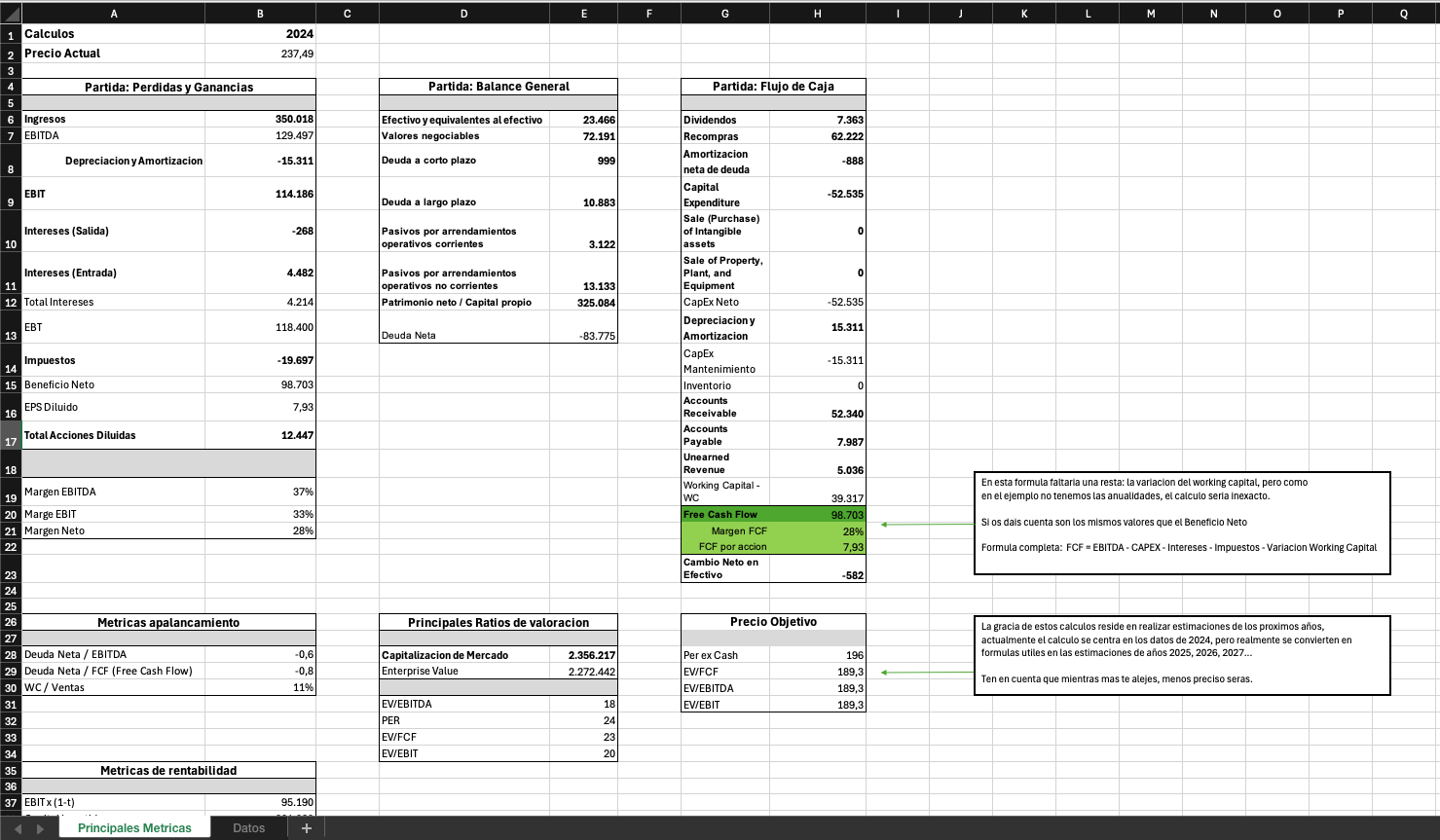
Accounting data collection
In this section we will see how to obtain the accounting data needed for the calculations performed by the template.
Data: In the example that follows we only collect data for 2024, but the process is the same for prior and future years.
Template: As mentioned at the start of this module, the template in its current version has a limitation: it only calculates one year. The real value of the analysis lies in having the calculations for the last ten years and, in addition, an estimate for the next five.
Data required for the calculations
Below are the data points the template needs: 36 in total.
Profit and Loss statement
This statement is also called “Income Statements”, “Consolidated Statements of Income” or “P&L”.
From here you need the following:
- Total Revenues: Total revenue
- Operating Income: Operating profit
- Interest Expense: Interest expense
- Interest And Investment Income: Interest and investment income
- Income Tax Expense: Income tax expense
- Weighted Average Diluted Shares Outstanding: Weighted average diluted shares outstanding
- Minority Interest: Minority interest
Balance Sheet
This statement is also called “Consolidated Balance Sheet”, “Consolidated Statement of Financial Position” or “Balance Sheet”.
From here we need the following:
- Cash and Equivalents: Cash and cash equivalents
- Total Cash And Short Term Investments: Total cash and short-term investments
- Accounts Receivable: Accounts receivable
- Inventory: Inventory
- Accounts Payable: Accounts payable
- Short-term Borrowings: Short-term borrowings
- Current Portion of Long-Term Debt: Current portion of long-term debt
- Current Portion of Capital Lease Obligations: Current portion of capital lease obligations
- Unearned Revenue Current: Current unearned revenue
- Long-Term Debt: Long-term debt
- Capital Leases: Capital leases
- Total Equity: Total equity
- Finance Division Debt Current: Finance division current debt
- Long-term Borrowings: Long-term borrowings
- Finance Division Debt Non Current: Finance division non-current debt
Cash Flow statement
This statement is also known as “Consolidated Statements of Cash Flows” or “Cash Flow”.
From here we will need the following:
- Depreciation & Amortization: Depreciation and amortization
- Amortization of Goodwill and Intangible Assets: Amortization of goodwill and intangible assets
- Capital Expenditure: Capital expenditure
- Sale of Property, Plant, and Equipment: Sale of property, plant and equipment
- Cash Acquisitions: Cash acquisitions
- Sale (Purchase) of Intangible assets: Sale (purchase) of intangible assets
- Total Debt Issued: Total debt issued
- Total Debt Repaid: Total debt repaid
- Repurchase of Common Stock: Repurchase of common stock
- Common & Preferred Stock Dividends Paid: Common and preferred stock dividends paid
- Net Change in Cash: Net change in cash
Other data
The following are not part of the financial statements, but as they are needed for the template I list them here:
- Date: How far back the analysis goes; for example, the template and calculations work with a 10-year history.
- Annual share price: Annual share price; the number of data points will depend on the date.
- Current share price: Current share price
How to collect the information
There are two ways to get the data:
- Free – we use the annual 10-K report or the equivalent reports in Europe.
- Paid – with a subscription to TIKR, Morningstar or other services.
Let’s look at an example so you can decide which approach suits you best.
The free option
The data that appear on other pages of the document will not always be in the same place. E.g.:
- 2024, page 40
- 2025, page 36
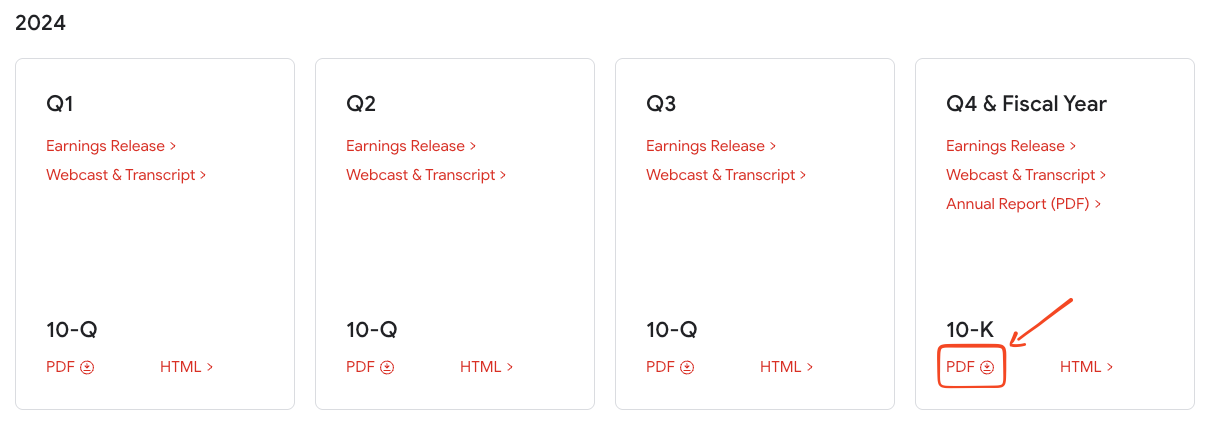
- URL for the investor relations page: https://abc.xyz/investor/
- We need the 10-K files, because they contain the annualized information. In this case we will review the latest annual results filed: 2024.
- If you choose 10-Q files instead, you will have to find all the relevant files and then add up all the data—in other words, do the work twice.
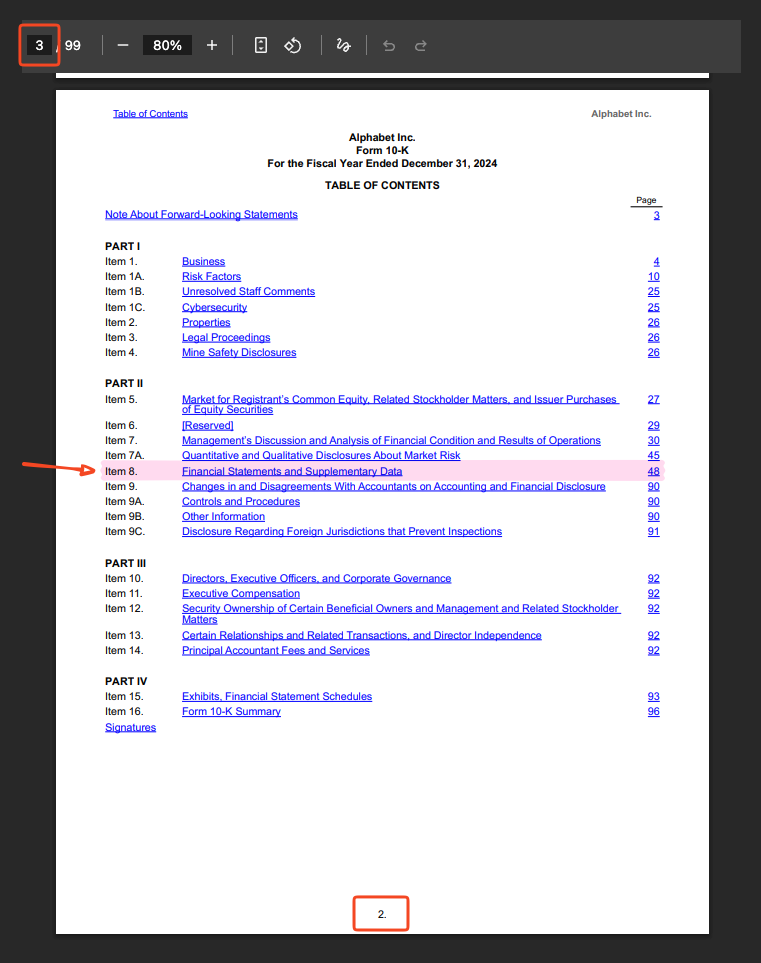
Once inside the 10-K file, go to page 3 (page 2 of the document), where you will find the index. From there go to:
- “Item 8. – Financial Statements and Supplementary Data”, which is on page 48.
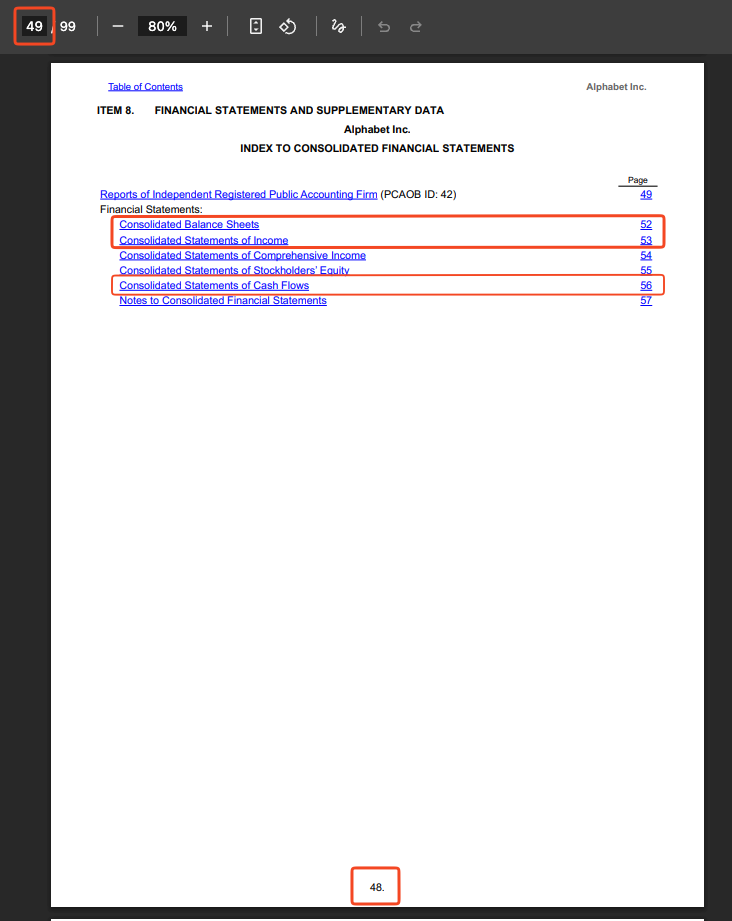
Once there, you will see that there is another index, and that the browser counter shows page 49, but the document says 48. That is because the document itself does not count the first page as it is the “cover”, but the browser counter does.
In the index we need to find the 3 statements. You will see that the Balance Sheet and P&L are in a different order, but that does not matter:
- Balance Sheet: Consolidated Balance Sheets
- Profit and Loss or “P&L”: Consolidated Statements of Income
- Cash Flow or “Cash Flow”: Consolidated Statements of Cash Flows
Let’s go step by step.
Balance Sheet – Consolidated Balance Sheets
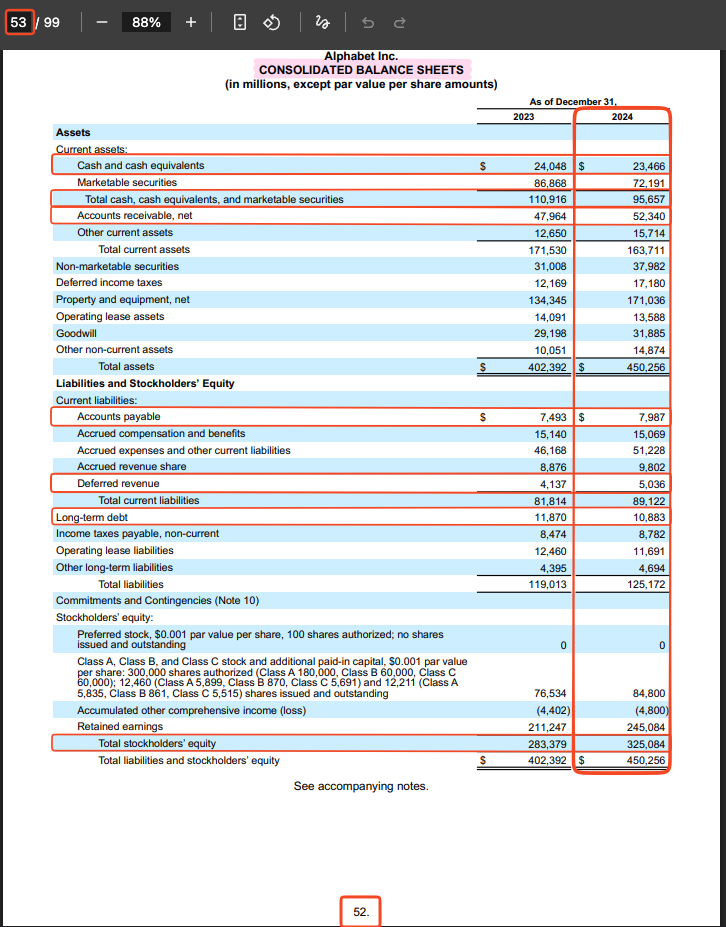
As the previous image shows, this statement is on page 52.
The structure of the required data list is as follows:
Name used by TIKR: Name as it appears on the sheet – Value for 2024
Data to collect:
- Cash and Equivalents: Cash and cash equivalents – 23,466
- Total Cash And Short Term Investments: Total cash, cash equivalents, and marketable securities – 95,657
- Accounts Receivable: Accounts receivable, net – 52,340
- Inventory: N/A.
- Accounts Payable: Accounts payable – 7,987
- Short-term Borrowings: N/A.
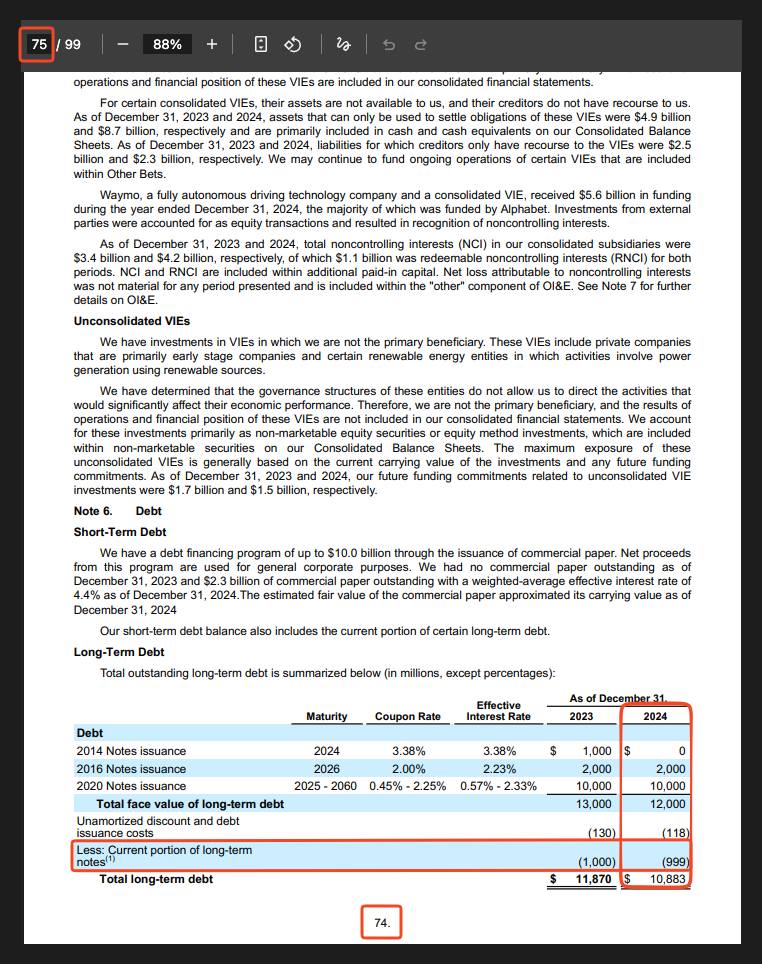
- Current Portion of Long-Term Debt: Not specified directly in the statement, but can be found in the document. P. 74: Less: Current portion of long-term notes (1) – (999)
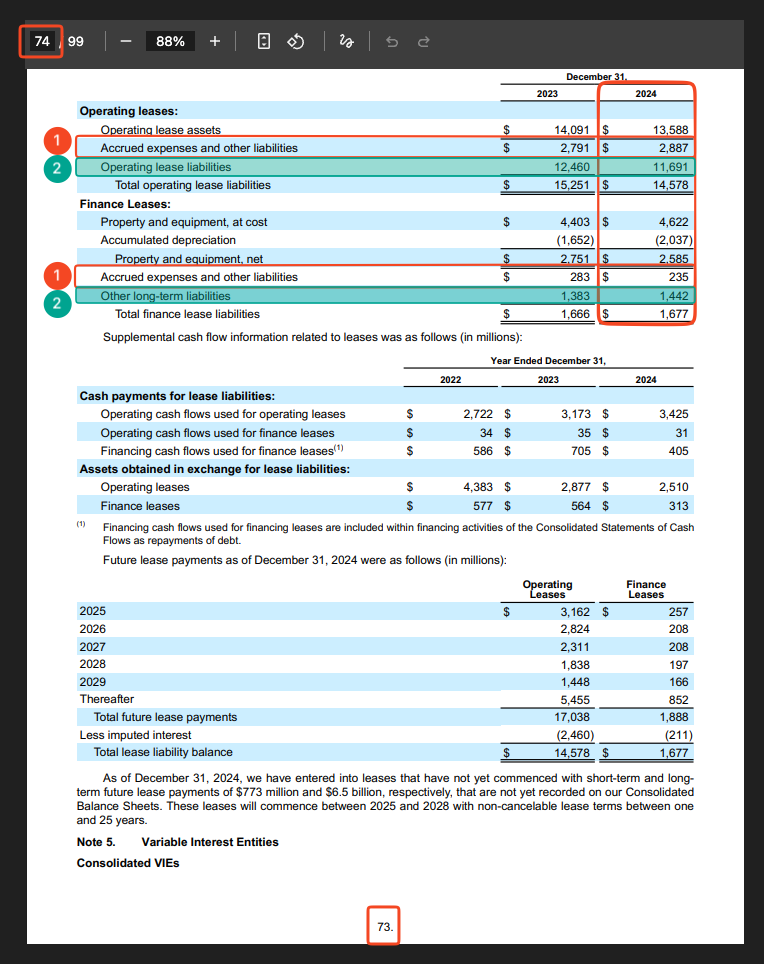
- Current Portion of Capital Lease Obligations: Not specified directly in the statement, but can be calculated. Formula: Operating Leases: Accrued expenses and other liabilities + Finance Leases: Accrued expenses and other liabilities. P. 73: 2,887 + 235 = 3,122
- Unearned Revenue Current: Deferred revenue – 5,036
- Long-Term Debt: Long-term debt – 10,883
- Capital Leases: Not specified directly in the statement, but can be calculated. Formula: Operating Leases: Operating lease liabilities + Finance Leases: Other long-term liabilities. P. 73: 11,691 + 1,442 = 13,133
- Total Equity: Total stockholders’ equity – 325,084
- Finance Division Debt Current: N/A.
- Long-term Borrowings: N/A.
- Finance Division Debt Non Current: N/A.
Example of what the formulas we used look like:
- Current Portion of Long-Term Debt: Not specified directly in the statement, but can be found in the document. P. 74: Less: Current portion of long-term notes (1) – (999)
Current Portion of Capital Lease Obligations: Not specified directly in the statement, but can be calculated. Formula: Operating Leases: Accrued expenses and other liabilities + Finance Leases: Accrued expenses and other liabilities. P. 73: 2,887 + 235 = 3,122
Capital Leases: Not specified directly in the statement, but can be calculated. Formula: Operating Leases: Operating lease liabilities + Finance Leases: Other long-term liabilities. P. 73: 11,691 + 1,442 = 13,133
Profit and Loss or “P&L” – Consolidated Statements of Income
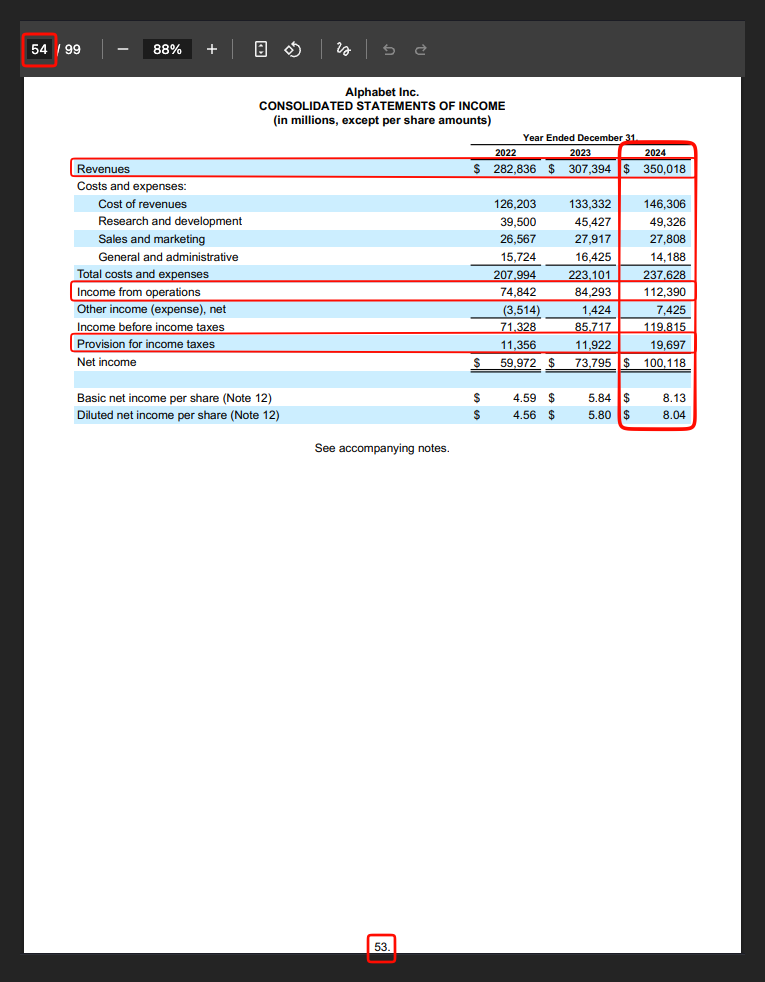
This statement is on p. 53.
Data we need:
- Total Revenues: Revenues – 350,018
- Operating Income: Income from operations – 112,390
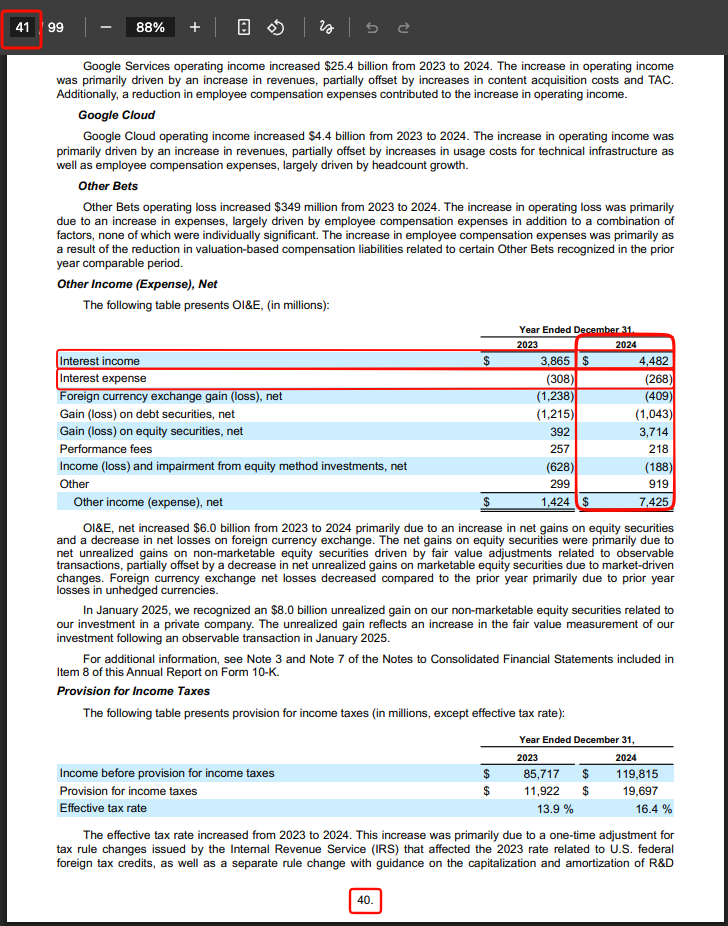
- Interest Expense: Not specified directly in the statement, but can be found in the document. P. 40: Interest expense – (268)
- Interest And Investment Income: Not specified directly in the statement, but can be found in the document. P. 40: Interest Income – 4,482
- Income Tax Expense: Provision for income taxes – 19,697
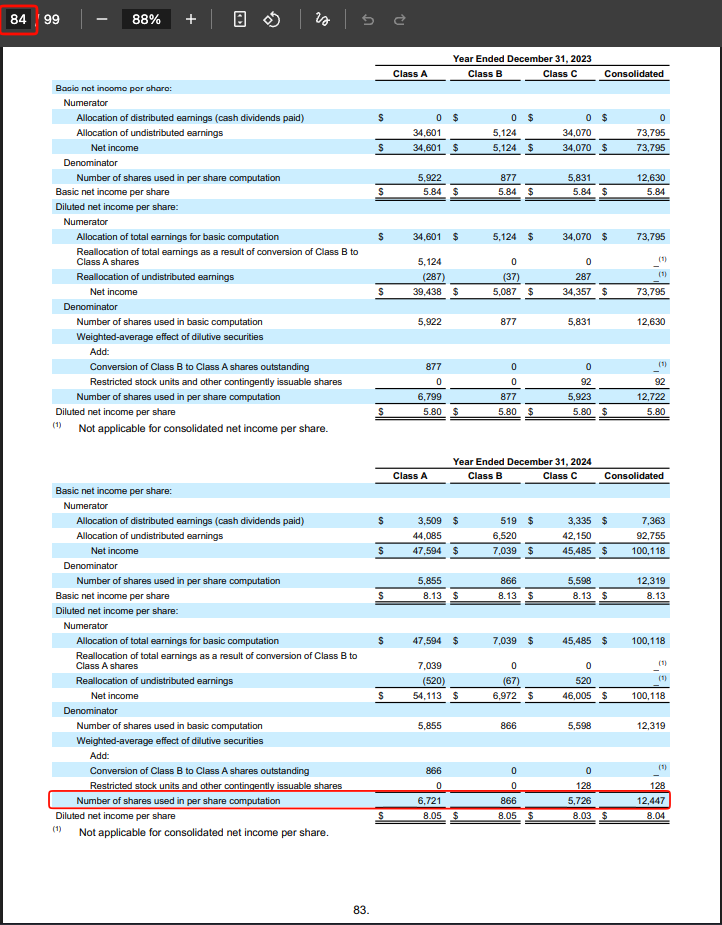
- Weighted Average Diluted Shares Outstanding: Not specified directly in the statement, but can be found in the document. P. 83: Number of shares used in per share computation – 12,447
- Minority Interest: N/A.
Example of data that appears elsewhere in the document:
- Interest Expense: Not specified directly in the statement, but can be found in the document. P. 40: Interest expense – (268)
- Interest And Investment Income: Not specified directly in the statement, but can be found in the document. P. 40: Interest Income – 4,482
- Weighted Average Diluted Shares Outstanding: Not specified directly in the statement, but can be found in the document. P. 83: Number of shares used in per share computation – 12,447
Cash Flow or “Cash Flow” – Consolidated Statements of Cash Flows
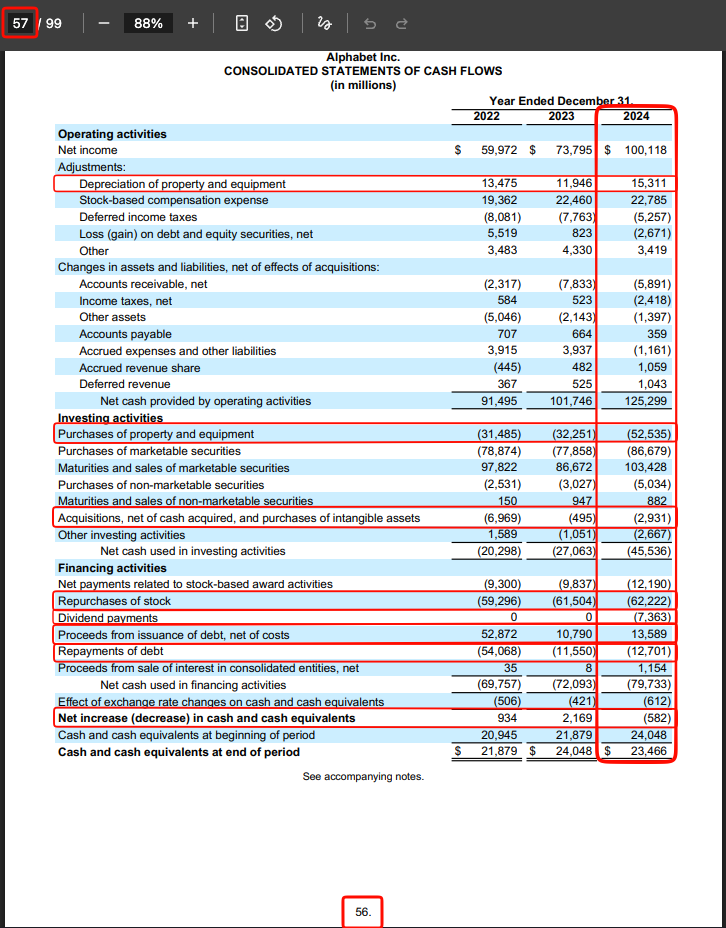
This statement is on p. 56.
Data we need:
- Depreciation & Amortization: Depreciation of property and equipment – 15,311
- Amortization of Goodwill and Intangible Assets: N/A.
- Capital Expenditure: Purchase of property and equipment – (52,535)
- Sale of Property, Plant, and Equipment: N/A.
- Cash Acquisitions: Acquisitions, net of cash acquired, and purchases of intangible assets – (2,931)
- Sale (Purchase) of Intangible assets: N/A.
- Total Debt Issued: Proceeds from issuance of debt, net of costs – 13,589
- Total Debt Repaid: Repayments of debt – (12,701)
- Repurchase of Common Stock: Repurchases of stock – (62,222)
- Common & Preferred Stock Dividends Paid: Dividend payments – (7,363)
- Net Change in Cash: Net increase (decrease) in cash and cash equivalents – (582)
The paid option
The paid option is to use the TIKR platform. The platform allows you to open a completely free account, but with certain limitations:
- It only shows the last 5 years.
- Coverage only for US companies.
Let’s look at what all the parameters/filters we need mean within “Detailed Financials”.
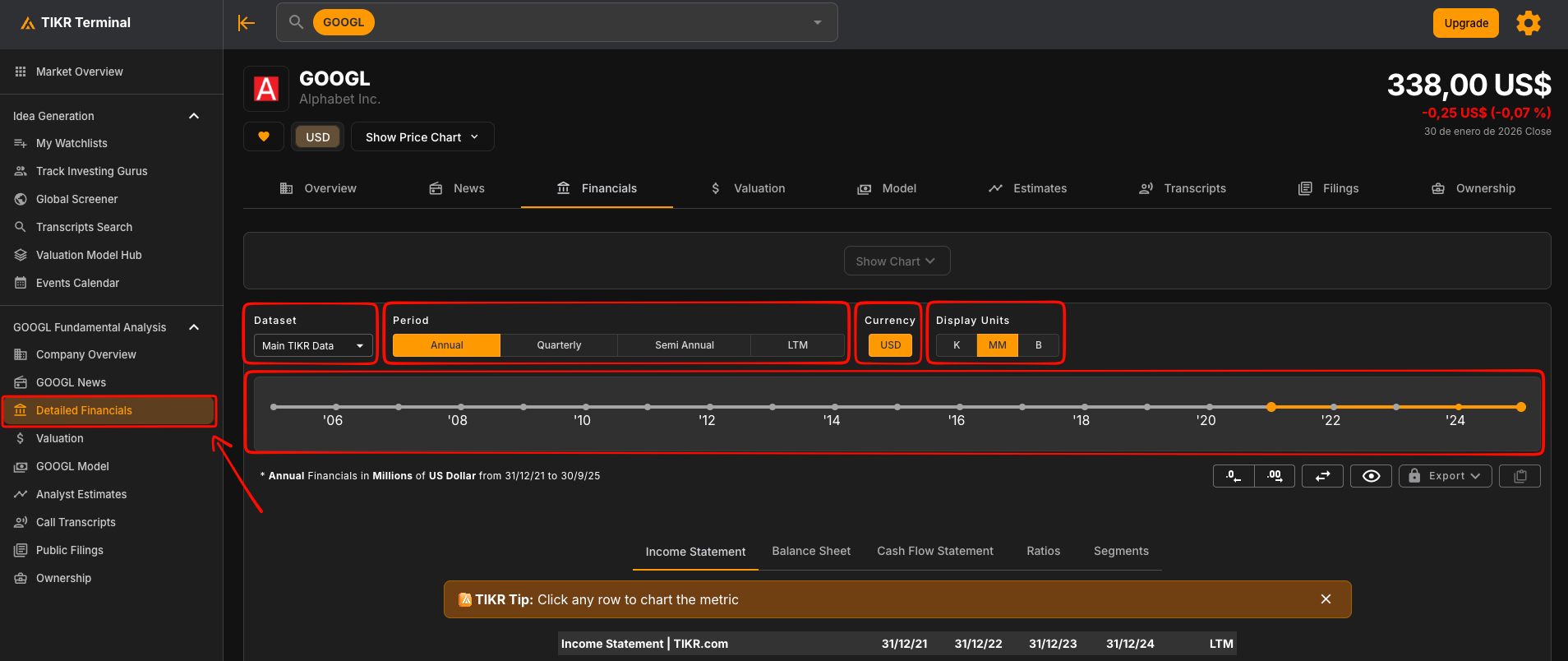
From left to right:
- Dataset: Different databases and where they come from. We want “Main TIKR Data” selected; they are usually more accurate because they review the full documentation, including the various notes, and adapt the information in the statements to what the notes say.
- Period: The accounting reporting period. We always want it set to “Annual”.
- Currency: Always choose the currency of the main market. Example:
- NASDAQ – US – USD
- BME – Spain – EUR
- Display Units: You want this set to billions.
- Year filter: For the template to work we need data for the last 10 years.
Next we will see how to get the required data; you will see that TIKR follows the accounting structure, but for clarity we will follow the same order as in company financial statements:
- Balance Sheet
- P&L
- Cash Flow
Click this link to access TIKR + GOOGL (NASDAQ).
TIKR URL: https://app.tikr.com/stock/financials?cid=29096&tid=11311662&tab=is&ref=zq5bgb
Or if you cannot click the link, once you are in your TIKR account, search for: GOOGL (NasdaqGS market).
Once inside TIKR, go to the “Detailed Financials” section, where you will see the statements described above.
Balance Sheet – Balance Sheet
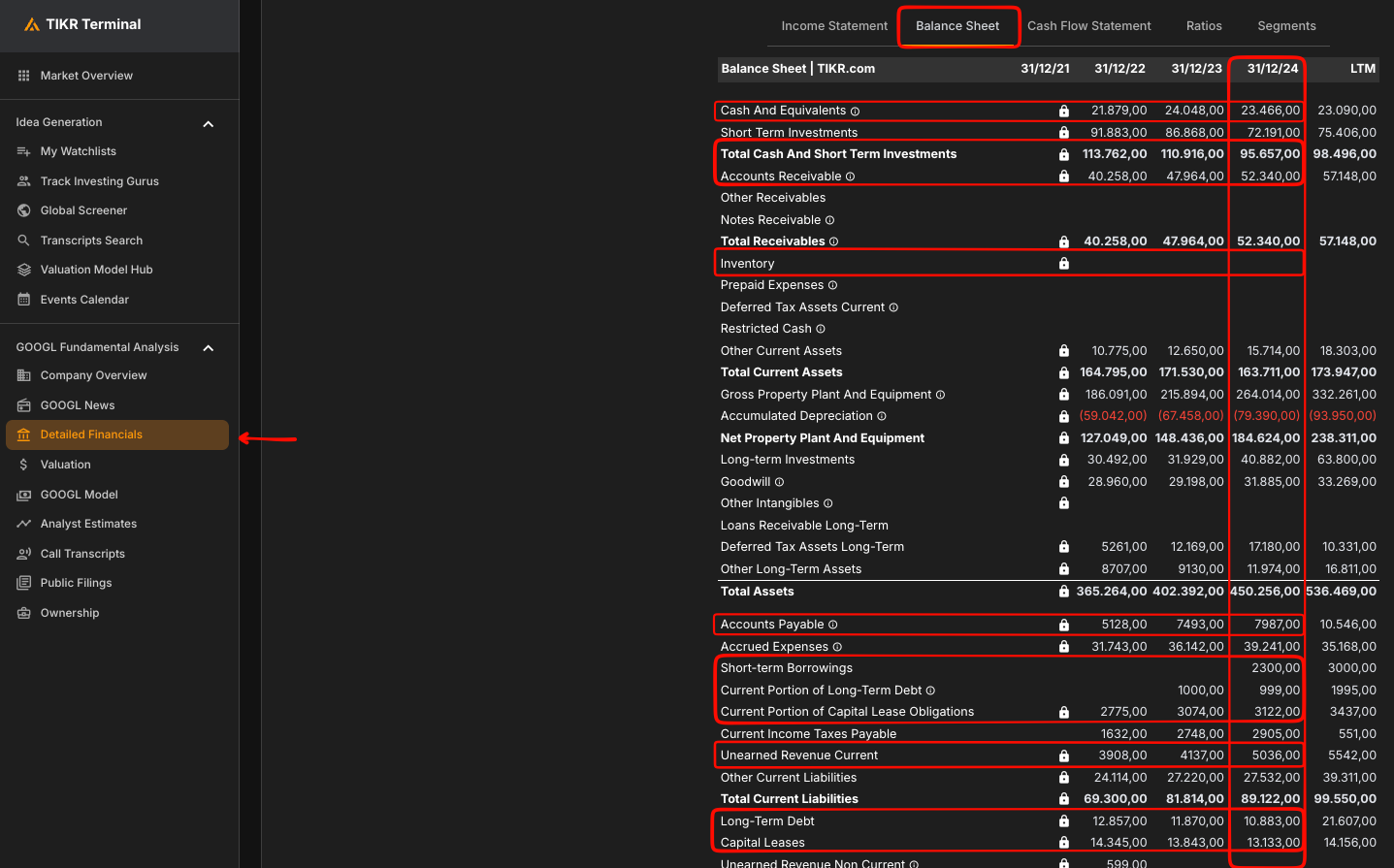
To simplify the view, the time filter is set to show 2024 and the current year 2025.
We care about the 2024 table because it has the actual figures for the company; 2025 figures and data can change, so that data is not useful for now.
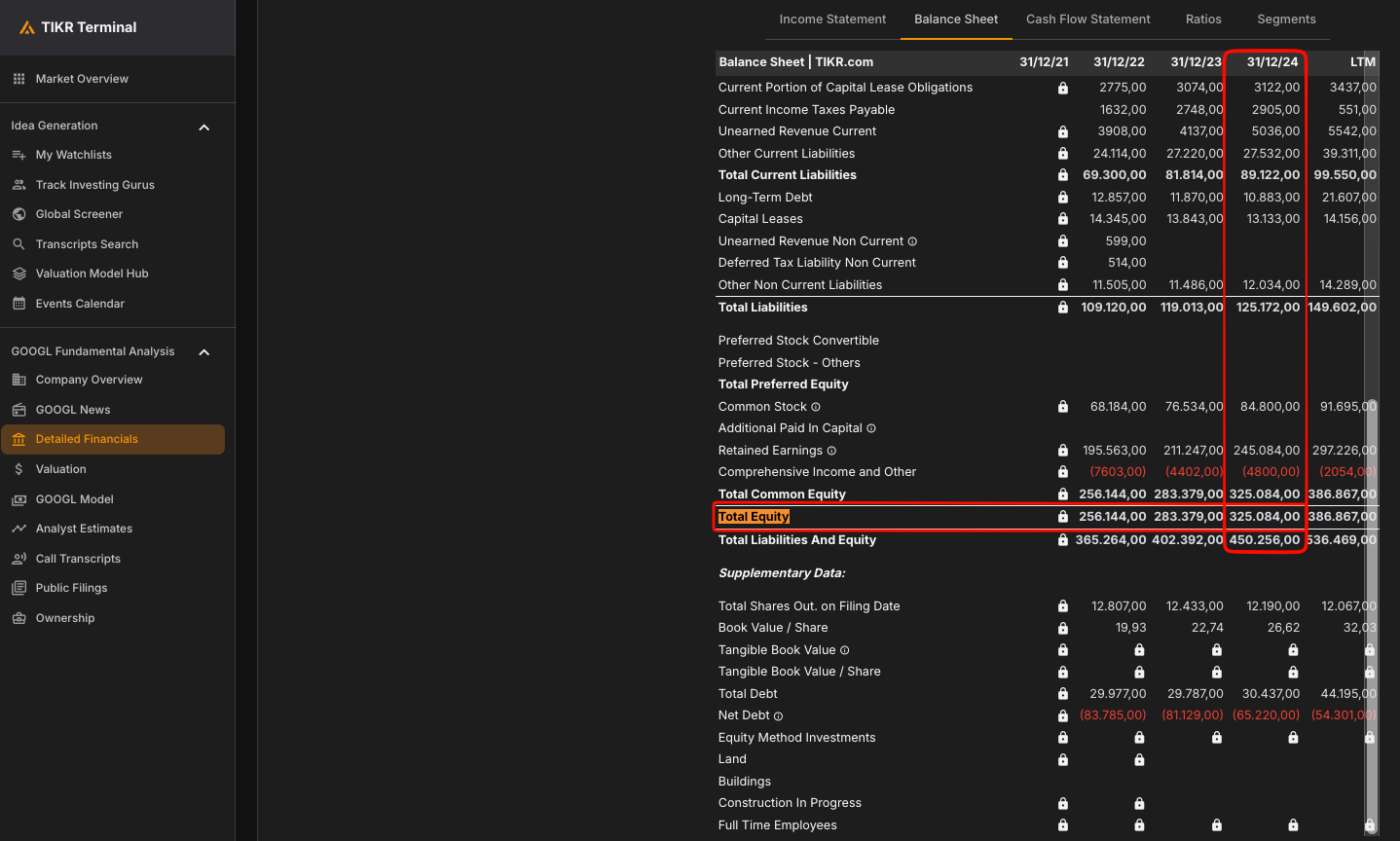
Data we need:
- Cash and Equivalents: 23,466
- Total Cash And Short Term Investments: 95,657
- Accounts Receivable: 52,340
- Inventory: N/A.
- Accounts Payable: 7,987
- Short-term Borrowings: 2,300 (Updated figure; it did not exist at the start of 2024)
- Current Portion of Long-Term Debt: 999
- Current Portion of Capital Lease Obligations: 3,122
- Unearned Revenue Current: 5,036
- Long-Term Debt: 10,883
- Capital Leases: 13,133
- Total Equity: 325,084
- Finance Division Debt Current: N/A.
- Long-term Borrowings: N/A.
- Finance Division Debt Non Current: N/A.
Profit and Loss or “P&L” – Income Statement
To see the following data, just switch from the “Balance Sheet” tab to the “Income Statement” tab.
Data we need:
- Total Revenues: 350,018
- Operating Income: 114,186
- Interest Expense: (268)
- Interest And Investment Income: 4,482
- Income Tax Expense: (19,697)
- Weighted Average Diluted Shares Outstanding: 12,447
- Minority Interest: N/A.


Cash Flow or “Cash Flow” – Cash Flow Statement
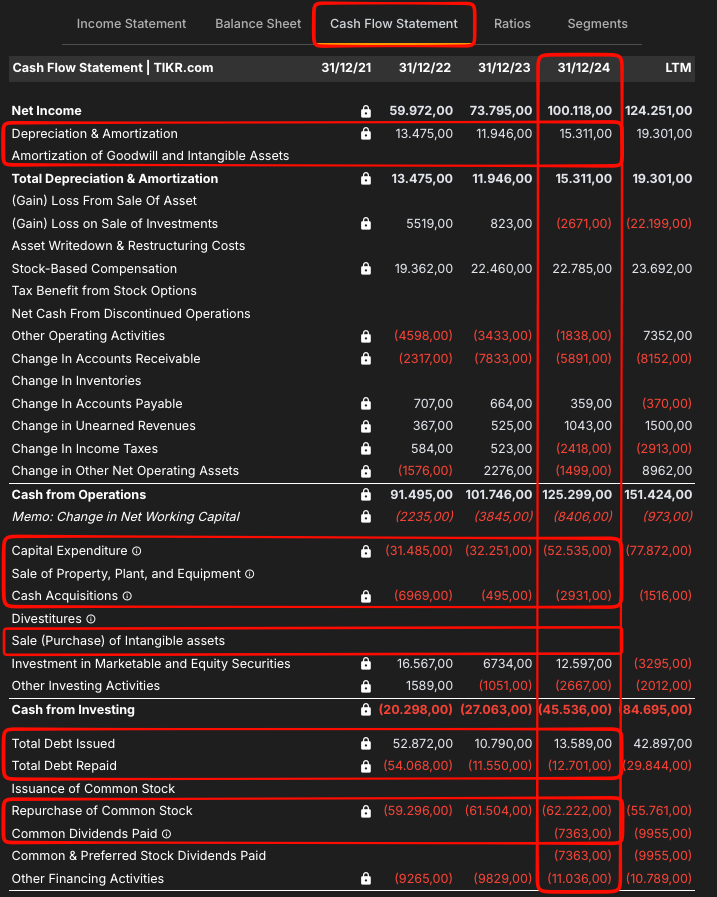
Switch to the tab called “Cash Flow Statement”; then look at the following information:
- Depreciation & Amortization: 15,311
- Amortization of Goodwill and Intangible Assets: N/A.
- Capital Expenditure: (52,535)
- Sale of Property, Plant, and Equipment: N/A.
- Cash Acquisitions: (2,931)
- Sale (Purchase) of Intangible assets: N/A.
- Total Debt Issued: 13,589
- Total Debt Repaid: (12,701)
- Repurchase of Common Stock: (62,222)
- Common & Preferred Stock Dividends Paid: (7,363)
- Net Change in Cash: (582)

Differences between the free option and TIKR
As you may have noticed, there are two main differences/drawbacks in the free option compared to the paid one.
Parameter names: These change and there is no standard. In fact, not only the name can change, but also the order, which makes the analysis significantly harder for beginners.
Parameter values: The value may be X, but then there may be an accompanying note explaining that, for certain reasons, it changes. With the free option you have to make an extra effort to understand what they say and adjust the parameter value according to the note; with the paid option (TIKR) they do that for you.
Conclusions
Everyone can choose the method they consider best, but what is clear is that TIKR provides the data:
- In a structured way—the same name and the same position every time.
- With the data adapted to the information from the full report.
Because of that we save time and headaches, but as said, everyone can choose the data extraction method that seems most convenient at any given time.
Could artificial intelligence (NotebookLM) be used to analyze the accounts?
Sometimes it helps, and quite a lot, but it is not recommended for beginners because it can hallucinate, and those hallucinations can lead you far from reality.
How to use the template?
With the 36 data points at hand, it is as simple as opening the Excel file, going to the sheet named “DATA” and entering the data in the corresponding cell.

The relevant calculations will be made automatically, following the formulas we have described above.